

To prevent Wi-Fi charges on a Disney Cruise, adjust your device’s data settings before departure. Disable cellular data and roaming features to avoid unexpected charges while at sea.
Configure Device Data Settings for Cruises
When embarking on a Disney cruise, it’s essential to manage your device’s data settings to avoid unexpected Wi-Fi charges. By adjusting specific configurations, you can ensure that your device remains connected only when you intend to use the ship’s internet services, helping you maintain control over your expenses while enjoying your vacation.
Before boarding, ensure that your smartphone or tablet is configured to avoid any data charges. This involves disabling certain features that may inadvertently use cellular data.
Turn off cellular data: Go to your device settings and toggle off cellular data. This will prevent any apps from using data while on the cruise.
Disable roaming: In the settings, find the roaming option and turn it off. This will stop your device from connecting to any cellular networks while at sea.
Use airplane mode: Activate airplane mode to completely cut off all wireless communications. You can then manually enable Wi-Fi when needed.
Wi-Fi Data Management on Disney Cruises
Managing Wi-Fi data on a Disney cruise is essential to avoid unexpected charges while staying connected at sea. Understanding the various settings and options available can help you control your usage effectively. This section will guide you through practical steps to ensure a seamless and cost-effective internet experience during your voyage.
Managing your data effectively while on a Disney Cruise is crucial. Understanding how to control your device’s settings can help maintain your budget.
Wi-Fi only mode: Ensure your device is set to use Wi-Fi only for internet access. This will prevent accidental data usage.
App updates: Before the cruise, update your apps while connected to Wi-Fi. This will prevent them from updating during the cruise, which can incur charges.
Download content: Download movies, music, or books before you leave. This will provide entertainment without needing to access the internet.
Disney Cruise Wi-Fi Package Insights
Navigating Wi-Fi options on a Disney Cruise can be tricky, especially with potential charges that can quickly add up. Understanding the different Wi-Fi packages available will help you make informed choices, ensuring you stay connected without incurring unexpected fees. This section provides valuable insights into the various packages and their features.
Disney offers various Wi-Fi packages that can be purchased onboard. Familiarizing yourself with these options can help you make informed decisions about connectivity.
| Wi-Fi Package | Price | Data Limit | Ideal For |
|---|---|---|---|
| Basic Package | $19.99 | 100 MB | Light browsing |
| Premium Package | $39.99 | 300 MB | Streaming and browsing |
| Unlimited Package | $89.99 | Unlimited | Heavy users |
Basic Package: Suitable for light browsing and checking emails.
Premium Package: Ideal for those who want to stream content and browse social media.
Unlimited Package: Best for frequent users who need constant access to the internet.
Recommended Products
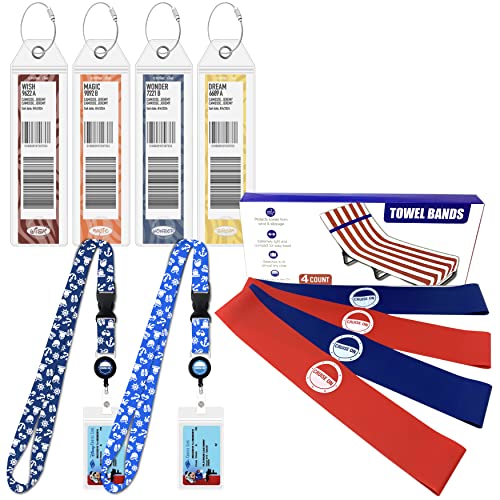
ESSENTIALS KIT: Your Disney Cruise Essentials kit includes 3 of our most up-voted cruise items in our incredibly popular "Must Have Cruise Packing List"

Official Disney Merchandise

Maximizing Offline App Functionality
When sailing on a Disney Cruise, staying connected can be a challenge, especially with potential Wi-Fi charges. Understanding how to maximize the functionality of offline apps can help you enjoy your trip without incurring extra costs. This section will explore practical tips to ensure your favorite apps work seamlessly while you’re away from the internet.
Many apps offer offline capabilities that can be beneficial during your cruise. Leveraging these features can help you avoid data charges.
Offline maps: Download maps before your trip to navigate ports without using data.
Offline playlists: Create playlists on music apps to enjoy your favorite songs without needing an internet connection.
E-books: Download e-books to read during your cruise. This eliminates the need for internet access.
Check for Automatic Updates and Syncing
When cruising with Disney, it’s essential to manage your device settings to avoid unexpected Wi-Fi charges. One key step is to check for automatic updates and syncing, as these can consume data without your knowledge. Adjusting these settings can help you maintain control over your data usage while enjoying your vacation at sea.
Automatic updates and syncing can lead to unexpected data usage. Adjusting these settings can help you avoid charges.
Disable automatic updates: Go to your app store settings and turn off automatic updates. This will prevent apps from updating without your consent.
Turn off syncing: Disable background syncing for apps that do not need constant updates. This will help conserve data usage.
Wi-Fi Charge Prevention on Disney Cruises
Navigating Wi-Fi charges on a Disney cruise can be tricky, especially with various data settings to consider. Understanding how to manage your device’s connectivity options is essential for avoiding unexpected fees while still enjoying the onboard experience. This section will provide practical tips to help you prevent unnecessary Wi-Fi charges during your voyage.
Failing to adjust your device settings can result in significant charges while on a Disney Cruise.
Recommended Products

Functionality:The fitted design of these hanging pockets ensured a snug and secure fit on your cabin door, allowing to display your gifts with pride while keeping them safely tucked away. The three-pocket design provided ample space for receiving and storing gifts.

Official Disney Merchandise

Official Disney Merchandise
Cruise Data Settings Checklist
When embarking on a Disney cruise, managing your data settings is crucial to avoid unexpected Wi-Fi charges. This checklist outlines essential steps to ensure your mobile device remains connected without incurring additional fees, helping you enjoy your vacation without the worry of data overages. Follow these guidelines to navigate your cruise experience seamlessly.
Before you leave for your cruise, double-check your settings to ensure everything is configured correctly.
Review settings: Go through each setting to confirm that cellular data and roaming are disabled.
Test airplane mode: Activate airplane mode and check that Wi-Fi is the only feature enabled.
Inform travel companions: Make sure everyone in your group is aware of these settings to avoid accidental charges.
